Everything it does, in plain words.
Every shield, every command and every little extra — what it does for your server, how it behaves out of the box, and what happens when something goes wrong.
15 systems and 82 commands, all included.
Links that do not belong
A link posted in your server is deleted before anyone can open it. Your own sites and invites can be exempted, so the links your community actually needs keep working.
- What counts as a link
- Any web address, with or without http:// or www.
- Your own links
- Add a rule for each link you trust. Only the matching link passes — a trusted domain does not rescue a message that also contains a bad one.
- Who is never caught
- Moderators, trusted roles, trusted members and the channels you exempt.
- What happens
- The message is deleted, and your log channel gets a short note: who, where and why.
Commands
/protection anti-link panelOpen link filter settings./protection anti-link enabledEnable or disable link filtering./protection anti-link regexEdit the patterns that catch blocked links./protection anti-link allowlistAllow links matching selected patterns.Invites to other servers
Invites are caught in every shape Discord writes them — discord.gg, discord.com/invite and discordapp.com/invite — with or without a protocol.
- What counts
- Any invite link, however it is typed.
- Checked first
- Invites are looked at before ordinary links, so your log names the right shield.
- Your own invite
- Allow your own server's invite without opening the door to everyone else's.
Commands
/protection anti-invite panelOpen Discord invite filter settings./protection anti-invite enabledEnable or disable invite filtering./protection anti-invite regexEdit the patterns that catch blocked invites./protection anti-invite allowlistAllow invites matching selected patterns.Spam bursts
If someone posts faster than anyone could read, the burst is cleared and the member is slowed down. Normal fast conversation is left alone.
- Default
- Five messages in five seconds.
- Adjustable
- Three to twenty messages, over a window of two to thirty seconds.
- Your log stays readable
- At most one alert every fifteen seconds, so a raid cannot bury your staff channel.
- Alongside Discord
- Discord's own AutoMod rules run separately if you also want filtering at the source.
Commands
/protection anti-spam panelOpen spam filter settings./protection anti-spam enabledEnable or disable spam filtering./protection anti-spam thresholdSet the message count and detection window.Rogue or stolen admins
If one account starts deleting channels, roles or members, the alarm goes off in your staff channel with the account, the action and where it happened.
- What it watches
- Channel deletions, role deletions and bans, taken from Discord's own audit history.
- Trigger point
- Three actions in a minute by default, adjustable from the protection panel.
- What it does
- Alerts you. Nothing is auto-banned or rolled back without a human deciding.
- On by default
- Yes, until you switch it off.
- Where alerts go
- The channel you set with /protection log-channel.
Commands
/protection panelOpen raid and anti-nuke settings./protection anti-nukeEnable or disable anti-nuke monitoring./protection anti-nuke-thresholdSet the destructive-action alert threshold./protection log-channelChoose where security alerts are posted.Raid joins
A flood of new accounts is not treated as ordinary growth. Synapse counts joins and tells you while it is happening, not afterwards.
- Checked every
- Fifteen seconds.
- Default
- Five joins in that window, adjustable from two to twenty-five.
- Somewhere to hold them
- Pick a quarantine role in /protection panel, so new accounts wait there while you decide what is real.
Commands
/protection raidEnable or disable raid protection./protection raid-thresholdSet the join count that triggers a raid alert.The trap channel
A channel ordinary members cannot see, and troublemakers cannot resist. Anyone who posts in it is quarantined, stripped of their roles and logged.
- Setting it up
- Hide the trap channel from every role in Discord itself; the bot never grants access to it.
- What happens next
- Quarantine by default. Choose the punishment with /honeypot punishment.
- Role removal
- Always on, so the account loses the roles that made it look legitimate.
- If it cannot act
- You are told why, instead of nothing appearing to happen.
Commands
/honeypot panelOpen honeypot settings./honeypot channelChoose the monitored channel./honeypot enabledEnable or disable enforcement./honeypot punishmentChoose the enforcement action.Discord's own filters
Synapse sets up Discord AutoMod for you, so some bad messages are stopped before they are ever delivered to the channel.
- Managing it
- /automod create builds or refreshes the rules; /automod enabled turns them on or off.
- Exemptions
- Discord's own exempt roles and channels, from the same panel.
- About the badge
- The “Uses AutoMod” profile badge is Discord's own, awarded at 100 rules across all servers. No bot can grant it.
Commands
/automod panelOpen AutoMod settings./automod createCreate or refresh Synapse AutoMod rules./automod enabledEnable or disable Synapse AutoMod rules.Moderation that explains itself
Warn, timeout, kick and ban all check the same things before they act: whether the person sits above the bot, whether the bot has permission, and whether the action is even possible.
- Order of checks
- Role position, then the bot's permissions, then whether the member can be acted on at all.
- Rare failures
- If everything passes and Discord still refuses, you get the real reason instead of a generic error.
- Warnings
- Kept per server with who, why and when; /warnings shows the recent history.
- Everyday control
- /lock, /unlock, /slowmode and /purge, so you do not need a second bot for the routine work.
Commands
/slowmodeSet or clear a channel's slowmode./warnRecord a moderation warning for a member./warningsReview a member's recent warnings./timeoutTemporarily prevent a member from interacting./kickRemove a member from this server./banBan a member and optionally delete recent messages.Levels, prestige and rank cards
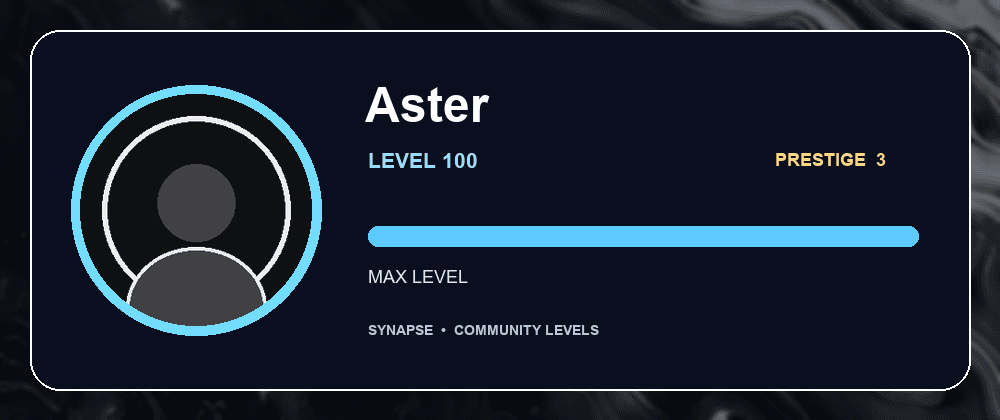
Chatting and hanging out in voice earn XP. The bot draws each member's card itself, with their own avatar, level and progress.
- Per message
- 15 to 25 XP, once a minute per member.
- In voice
- 5 XP a minute while connected.
- Prestige
- At level 100 a member can start again and carry a prestige mark on their card.
- Rewards
- Give a role at a chosen level. It is granted once and tracked, so a demotion does not hand it out twice.
Commands
/level checkView a member's level and prestige banner./level leaderboardView this server's level rankings./level prestigeReset level 100 progress and gain a prestige./level panelConfigure level rewards and announcements.Welcomes worth reading
New members arrive to a card with their own avatar, their name and your server's backdrop, posted once in the channel you choose.
- Join roles
- A role can be granted automatically, after the bot checks it is allowed to assign it.
- Onboarding
- Optionally wait for Discord onboarding to finish before greeting them.
- If something is missing
- A missing channel or permission is reported, rather than quietly swallowed.
Commands
/welcome panelConfigure welcome settings./welcome channelSet or disable the welcome channel./welcome enabledEnable or disable welcome messages./welcome join-rolesChoose a role to grant new members./welcome onboardingConfigure whether welcome actions wait for Discord onboarding.Tickets that stay tidy
A public panel opens a private channel for each request, with your staff roles already in it and a transcript when it closes.
- The panel
- /tickets publish posts or refreshes it in the channel you pick.
- Who answers
- /tickets roles decides which roles can see and reply.
- Transcripts
- Saved to the channel you choose. There is no outside archive.
Commands
/tickets panelConfigure tickets./tickets rolesAdd or remove ticket moderators./tickets categoryChoose where new tickets are created./tickets transcript-channelChoose where transcripts are sent./tickets panel-channelChoose where the public ticket panel is posted./tickets publishPost or refresh the ticket panel.Credits and little extras
Credits are per server and per member, with daily and hourly cooldowns so nobody farms them.
- Balances
- Kept with the rest of the bot's data; /pay sends credits to another member.
- Cooldowns
- Tracked separately for each member, in each server.
Commands
/balanceCheck your or another member's credits./dailyClaim daily credits./workEarn credits once per hour./payTransfer credits to another member.A jukebox in your own server
Members upload audio into your server's own library and play it in voice. No outside music service, no account, no subscription.
- Library
- Files and details stay with the bot, per server.
- Controls
- Play, pause, skip, volume and stop work only for members in the same voice channel as the bot.
- Where tracks come from
- Members upload them, and each upload stays with your server — nothing is streamed from an outside service.
Commands
/music uploadAdd an audio file to this server's library./music playQueue a track and start playback./music pausePause the current track./music nextSkip to the next queued track./music volumeChange the jukebox volume./music stopStop playback, clear the queue and leave voice.Look things up without leaving Discord
Check a member, channel, role, emoji or the server itself, and use the everyday channel controls — all inside Discord.
- Lookups
- /userinfo, /serverinfo, /channelinfo, /roleinfo, /rolelist and /emojiinfo.
- Channel control
- /lock, /unlock, /slowmode and /purge, each checking permissions first.
- No outside calls
- Times, counts and calculations all happen on the bot.
Commands
/helpOpen this command guide./userinfoView a member's profile and server details./serverinfoView server details and community statistics./channelinfoInspect a text channel's settings and permissions./roleinfoInspect a server role and its permissions./purgeDelete recent messages in this channel./avatarShow a member's profile picture./lockPrevent members from sending messages in this channel./unlockRestore this channel's inherited message permissions./rolelistBrowse server roles and member counts./emojiinfoInspect a custom or Unicode emoji./snipeView the latest deleted or edited message in a channel.Away status that cleans up after itself
Set /afk with a reason. Anyone who mentions you sees it, along with how long you have been away, and the notice removes itself after seven seconds.
- Scope
- Per server — being away in one does not change another.
- Clears itself
- The next time you send a message in that server.
- Not noisy
- One short notice per mention, deleted automatically.
Commands
/afkSet your server-specific AFK status and optional reason.